
如何将卡片模板连接到 CSV 文件
您将学到什么
使用 Database Wizard 将 CSV 文件连接到卡片模板,将其中的列关联到卡片对象,并在 Operating mode 中显示记录。
开始之前
-
一个在 Design mode 中打开的模板。本例使用
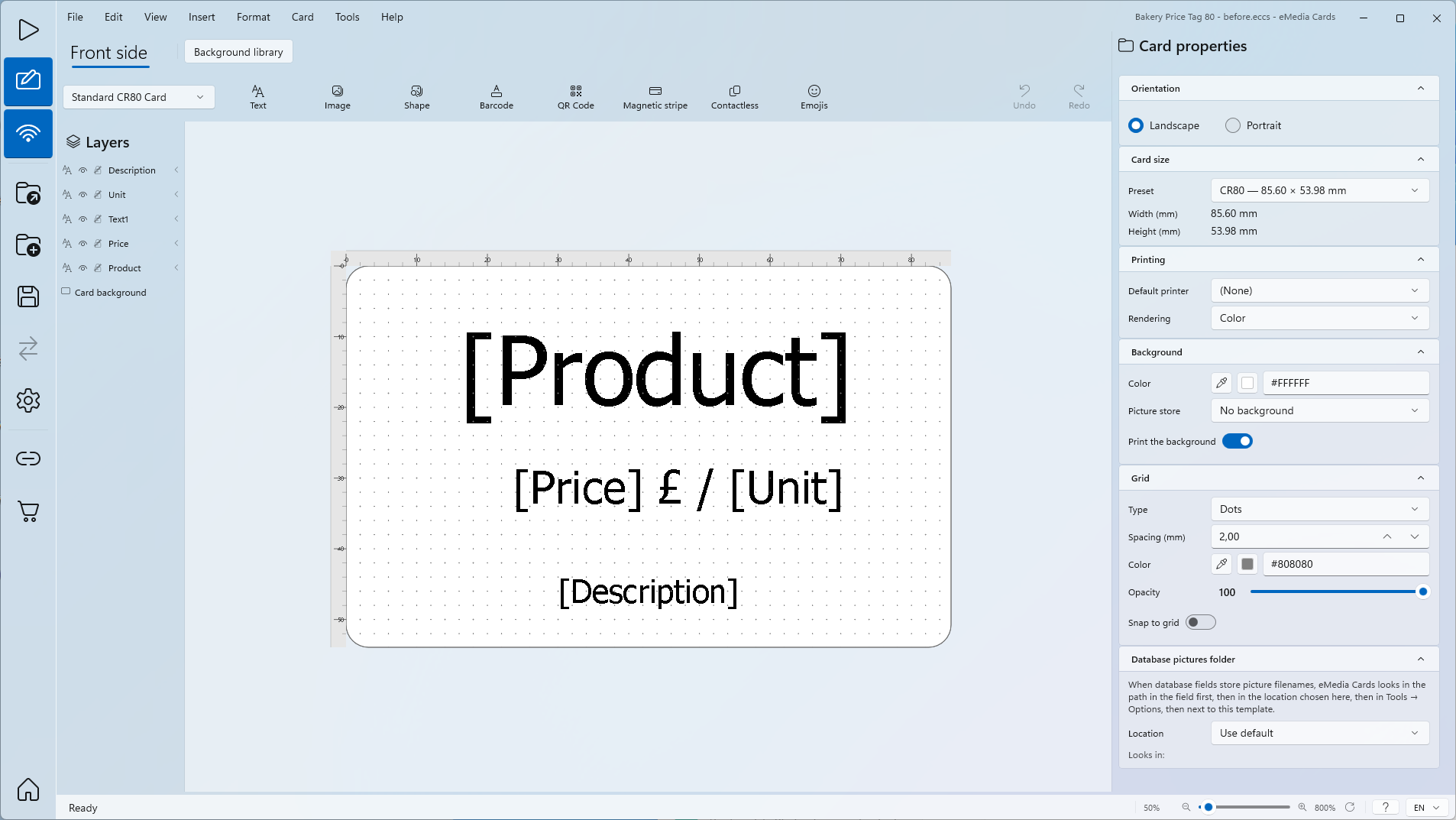
Bakery Price Tag 80.eccs,这是一张 CR80 规格的价签,仅有正面。Product、Price、Unit 和 Description 是以数据库字段为数据源的文本对象。Text1 是固定文本(£ /)。 -
一个带标题行的 CSV 文件。本例使用
Bakery Price Tag 80 semicolon.csv:80 行,分隔符为;,列为SKU;ProductName;Price;Unit;Category;DescriptionLine1;DescriptionLine2;Organic;Barcode。 -
使用分隔符的
.txt或.tsv文件也可以通过 Excel / CSV 以相同方式连接。 -
两个示例文件都在示例文件 ZIP 包中,并附有
README.txt。数据均为虚构。 -
Starter 版仅使用 CSV 文件的前 50 行。Standard 版使用全部行。
如何将 CSV 文件连接到模板
-
解压示例文件,打开
Bakery Price Tag 80.eccs。模板在 Design mode 中打开,未连接任何数据库。
-
点击 Tools > Connect to database...。Database Wizard 打开第 1 步 Connection。
-
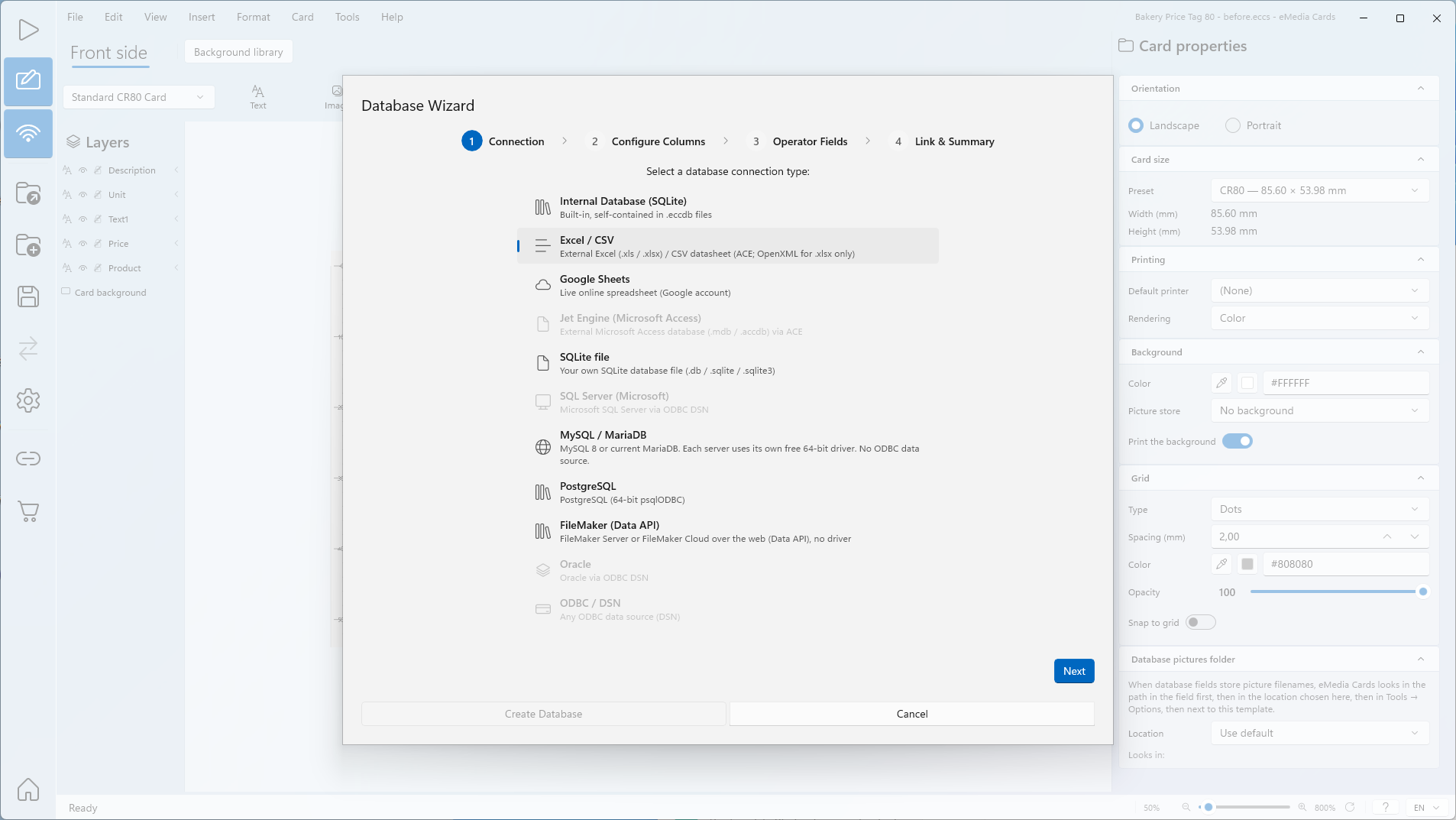
在 Select a database connection type: 下,点击 Excel / CSV。
-
点击 Next。打开第 2 步 Configure Columns。
-
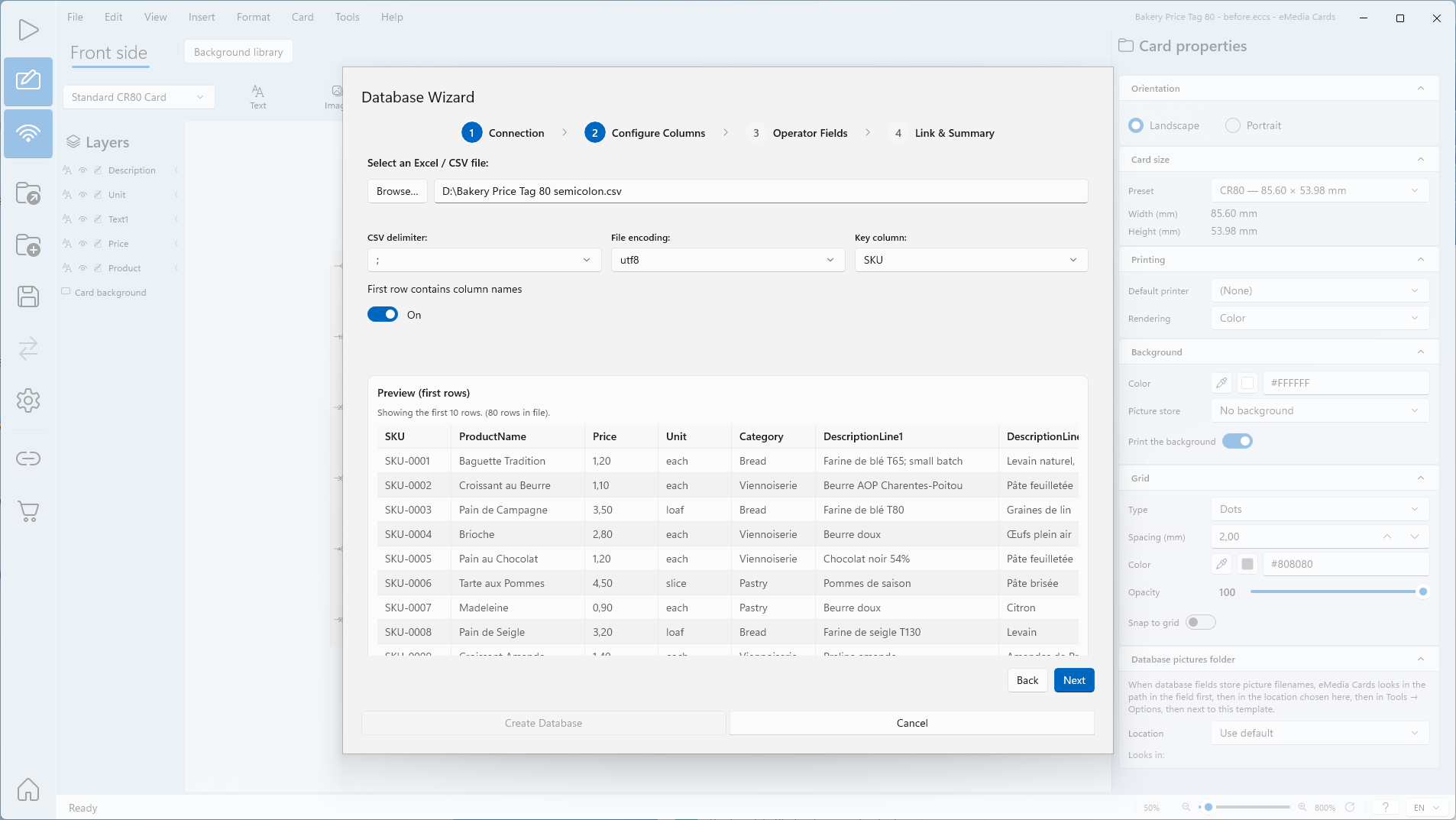
在 Select an Excel / CSV file: 下,点击 Browse…,打开
Bakery Price Tag 80 semicolon.csv。截图中的文件为D:\Bakery Price Tag 80 semicolon.csv。Preview (first rows) 表格显示文件的前 10 行以及文件的行数。 -
检查 CSV delimiter:。分隔符通常会自动检测:这里是
;。如果预览只显示一列,或列的拆分位置不对,请选择,、;、Tab 或|。 -
检查 File encoding:。这里为
utf8。如果预览中带重音的字符显示不正确,请更改编码。 -
保持 First row contains column names 处于开启状态。
-
在 Key column: 中,选择每一行值都唯一的列。这里为默认的 SKU。
-
点击 Next。打开第 3 步 Operator Fields。
-
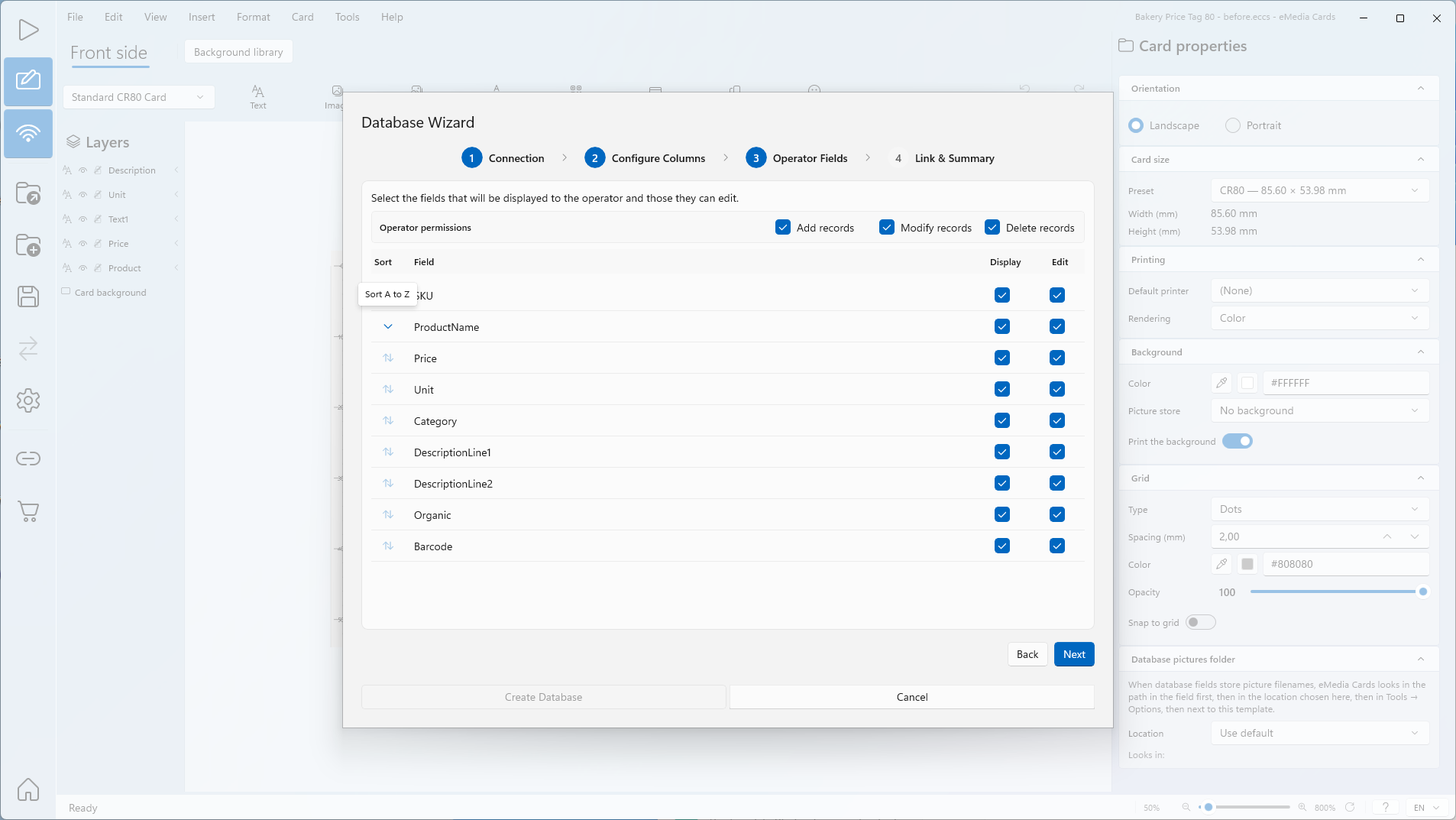
在 Display 列中,取消勾选操作员不需要看到的字段。默认情况下所有字段均已勾选。
-
在 Edit 列中,取消勾选操作员不得修改的字段。
-
在某个显示的字段上点击 Sort,设置 Operating mode 中记录的排列顺序。工具提示会显示排序方式:Sort A to Z 或 Sort Z to A。只能对一个字段排序。这里为 ProductName 上的 Sort A to Z。
-
可选:在 Operator permissions 下,取消勾选 Add records、Modify records 或 Delete records。
-
点击 Next。打开第 4 步 Link & Summary。
-
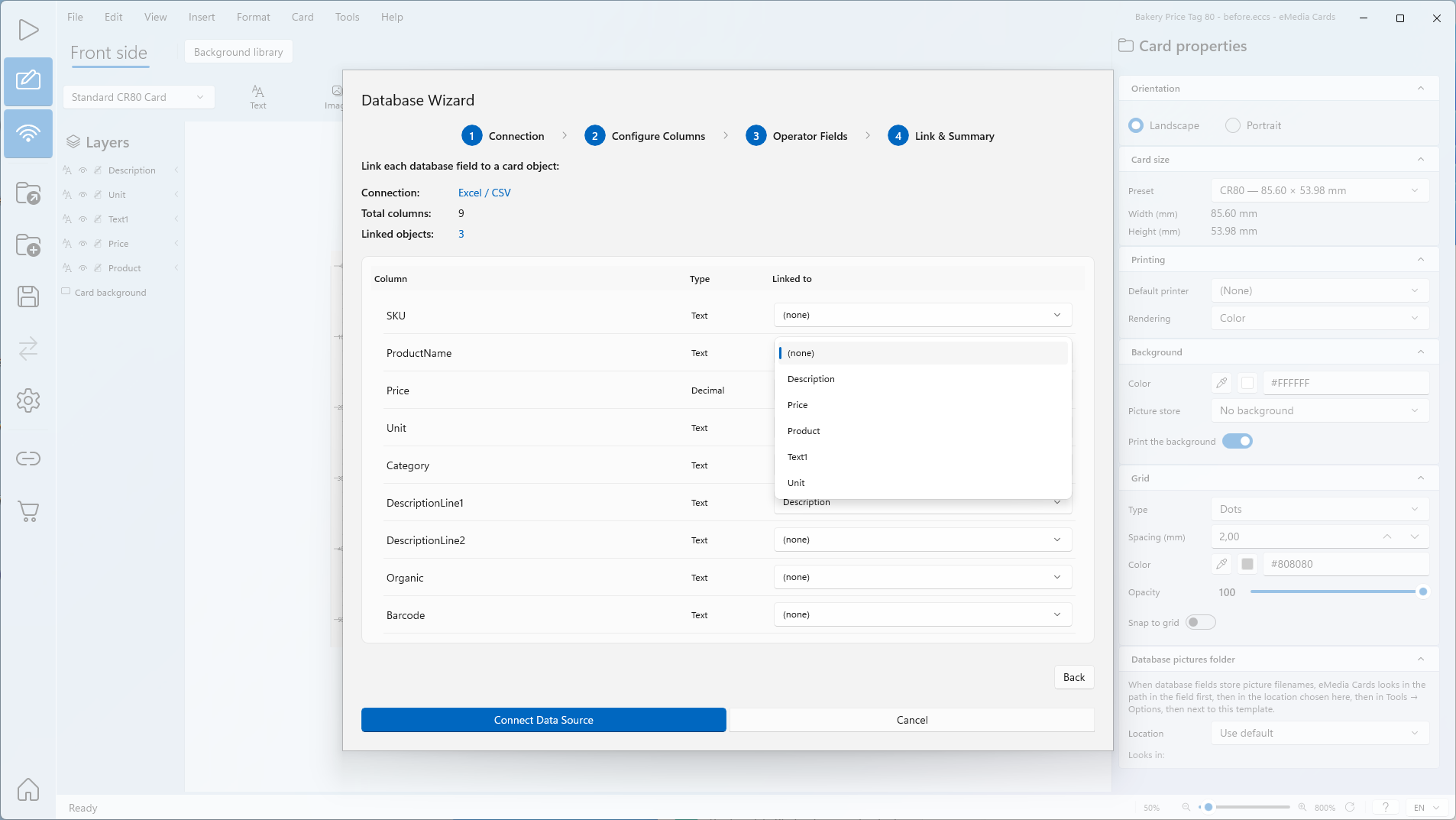
检查 Connection:、Total columns: 和 Linked objects:。名称与卡片对象相同的列会自动关联:这里为 Price 和 Unit。
-
在 ProductName 的 Linked to 列表中,选择 Product。
-
在 DescriptionLine1 的 Linked to 列表中,选择 Description。
-
其他列保持为 (none)。设为 (none) 的列不会显示在卡片上。
-
点击 Connect Data Source。
-
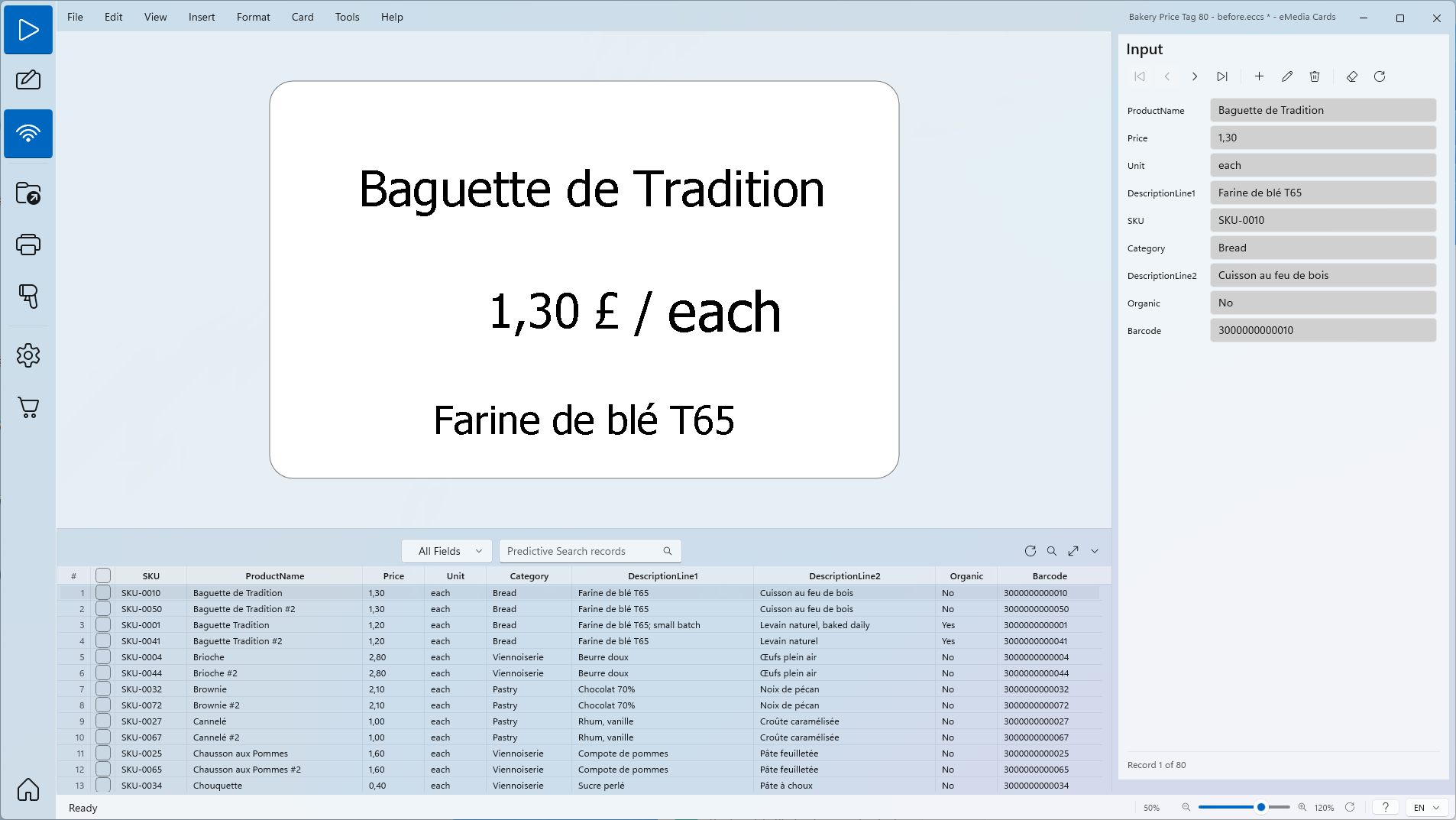
点击 View > Operating mode。连接数据源不会切换模式。卡片按 ProductName 顺序显示第一条记录。
提示
-
CSV 文件始终是实时数据库。在 Operating mode 中添加、修改或删除记录都会写入该文件。
-
连接之前以及 eMedia Cards 使用该文件期间,请在 Excel 中关闭该文件。eMedia Cards 需要独占访问该文件。
常见错误
| 现象 | 原因 | 解决方法 |
|---|---|---|
| The CSV file "Bakery Price Tag 80 semicolon.csv" is open in another program, so eMedia Cards can't read it. Close the file in that program, then click Browse… and select it again. | 文件已在 Excel 或其他程序中打开。eMedia Cards 需要独占访问。 | 在 Excel 中关闭该文件。点击 Browse…,重新选择该文件。 |
| The CSV file "Bakery Price Tag 80 semicolon.csv" is open in another program or is still syncing, so eMedia Cards can't read its records right now. Close the file in that program, or wait for the sync to finish, then choose Requery. | 连接后又在 Excel 中打开了该文件,或云同步仍在进行。 | 在 Excel 中关闭该文件,或等待同步完成。点击 Requery。 |
| The CSV file "Bakery Price Tag 80 semicolon.csv" is open in another program or is still syncing, so eMedia Cards can't save your change right now. Close the file in that program, or wait for the sync to finish, then try again. | 在保存、添加或删除时,Excel 正打开着该文件。 | 在 Excel 中关闭该文件,然后再次保存。 |
| The CSV file "Bakery Price Tag 80 semicolon.csv" is read-only or you don't have permission to change it, so eMedia Cards can't save your change. Check the file's permissions, then try again. | 文件为只读,或用户没有写入权限。连接、浏览和打印仍可正常进行。不会写入任何内容:卡片保持在 Edit 或 Add 模式,已删除的记录会被保留。 | 清除只读属性或授予写入权限,然后重试。 |
| No rows found in this source. | 分隔符不正确,或文件为空。 | 选择正确的 CSV delimiter:。 |
| This key column has duplicate values in the sample. Prefer a unique ID for reliable updates. | 键列中有多行的值相同。 | 选择值唯一的 Key column:。 |
| Select at least one field to display to the operator. | 没有任何字段勾选了 Display。 | 至少为一个字段勾选 Display。 |
| 应显示在卡片上的列,其 Linked to 显示为 (none)。 | 列名与卡片对象的名称不一致。 | 在 Linked to 中选择该对象。 |
对于 .txt 或 .tsv 文件,提示信息相同,并且仍然显示 CSV。