
eMedia Cards takes it from there.
eMedia Cards
CARD CREATION.
REIMAGINED.
ID card and badge printing software for Windows and macOS
eMedia Cards is the ID card and badge software from Mediasoft Development: design, personalize and print PVC cards on Windows and macOS, from €29/year excl. VAT.
A new generation of eMedia.Scroll to discover
Proven experience. A fresh perspective.
Built on decades of
card printing expertise.
Redesigned from
the ground up.
eMedia Cards is the result of everything we've learned from decades of designing card creation and printing software — rebuilt for the way people work today.
25 years
of experience
150,000+
installations worldwide
A new generation of eMedia.
Built on proven experience.
An entirely new beginning
Everything
starts here.
Your templates. Your recent cards. Your data.
Everything you need to start creating, in one place.
01 / 03
Start inspired.
Choose from professionally designed templates and make them yours.
Less clicking.
Less waiting.
More creating.
Up to4×faster.
From launching eMedia Cards to designing, editing and producing cards, everyday actions have been reworked to keep you moving.
Fewer steps.
Everything within reach.
Small actions.
Big difference.
50+ improvements.
Every part of the eMedia experience has been reviewed, redesigned or improved.
And you'll feel it everywhere.
From the first idea to the final card
Beautifully simple.
Surprisingly powerful.
Set the tone for your card.
Make it unmistakably yours.
Add exactly the information you need.
Everything under control.
Fine-tune graphics, colors and every finishing touch.
Connect your database and browse your records to make sure every card looks right.
Just a few clicks. Professional results.
Professional cards, ready to use.
01 / 09
Face Detection + Photo Studio
Perfect portraits.
Every time.
From capture to final card, eMedia Cards gives you everything you need to create consistent, professional cardholder portraits.
01 — Frame
Perfectly framed.
Automatically.
Face Detection finds the cardholder's face and automatically frames the portrait correctly.
02 — Refine
Make every portrait
look its best.
Remove the background.
Replace it.
Fine-tune the picture.
All without leaving eMedia Cards.
Connected to Google
Your cards.
Your data.
Cloud synced.
Connect eMedia Cards directly to Google Sheets and keep your cardholder records up to date.
Your data.
Always in sync.
Google Sheets ↔ eMedia Cards
Your pictures.
Right where you need them.
Your designs.
Safely backed up.
Data → Google Sheets
Pictures → Google Drive
Templates → Google Drive
eMedia Cards Licensing
Your license.
Your DNA.
Computers change.
Your eMedia doesn't.
Unlock.
Your license unlocks eMedia Cards.
Sync.
Restore your backed-up templates from Google Drive.
Continue.
Wherever you go, your license unlocks the power of eMedia Cards.
eMedia Cards Mobile
Capture anywhere.
Print anywhere.
Capture photos, information and signatures from your smartphone and send them directly to eMedia Cards.
1 m
From one metre away to the other side of the world.
Photo. Information. Signature.
Send to eMedia Cards.
Your eMedia Cards workstation receives the information.
You're ready to produce and print.
If you're connected,
you're ready to print.
CoolReader
Scan.Match.Print.
Scan a QR code received by email or presented on a smartphone. CoolReader finds the corresponding record and prepares the right card for printing.
Thousands of records.
One scan.
The right card.
No searching.
No typing.
Just scan.
eMedia Cards Assistant
AI Assistant.
Ready to help.
Need help using eMedia Cards?
Just ask.
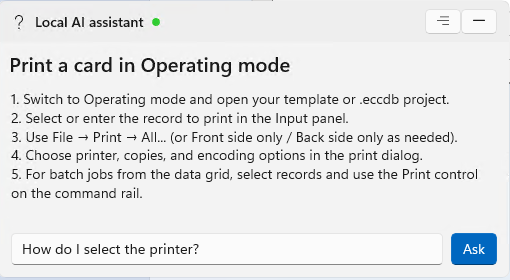
Powered locally.
Your AI assistant runs directly on your computer.
Your questions stay on your computer.
And this is only the beginning.
eMedia Cards keeps getting better.
Never behind.
Always ahead.
A great idea can come from anywhere.
Customer“Could we make this easier?”
Partner“What if eMedia could connect to this?”
Printer manufacturer“Can you support our new feature?”
Mediasoft“We have an idea.”
IdeaDevelopUpdateeMedia Cards users
One idea can make eMedia Cards
better for everyone.
Choose your edition
More room to create.
More ways to work.
Start with the essentials. Choose Standard for a more productive card workflow. Professional is coming soon, with advanced database connections and more.
Why Standard
- Print and export in batches
- Connect more of your data
| Features | StarterAvailable at launch | StandardAvailable at launchRecommended | ProfessionalComing soon |
|---|---|---|---|
| Card design | |||
| Create and personalize cards with templates, text and images | Starter✓ Included | Standard✓ Included | Professional✓ Included |
| Design both sides of a card | Starter✓ Included | Standard✓ Included | Professional✓ Included |
| Use custom card formats | Starter— Not included | Standard✓ Included | Professional✓ Included |
| Create classic barcodes | Starter✓ Included | Standard✓ Included | Professional✓ Included |
| Create generic QR codes | Starter— Not included | Standard✓ Included | Professional✓ Included |
| Create specialized QR codes for contacts, Wi-Fi, email, phone and SMS | Starter— Not included | Standard✓ Included | Professional✓ Included |
| Printing & export | |||
| Print individual cards | Starter✓ Included | Standard✓ Included | Professional✓ Included |
| Print cards in batches | Starter— Not included | Standard✓ Included | Professional✓ Included |
| Export card designs as PNG or PDF | Starter— Not included | Standard✓ Included | Professional✓ Included |
| Database compatibility | |||
| Internal Database (SQLite) | Starter50 records max | Standard✓ Included | Professional✓ Included |
| Import Excel / CSV into the internal database | Starter50 records max | Standard✓ Included | Professional✓ Included |
| Excel / CSV | Starter50 records max | Standard✓ Included | Professional✓ Included |
| Google Sheets | Starter— Not included | Standard✓ Included | Professional✓ Included |
| Jet Engine (Microsoft Access) | Starter— Not included | Standard— Not included | Professional✓ Included |
| SQLite File | Starter— Not included | Standard✓ Included | Professional✓ Included |
| SQL Server (Microsoft) | Starter— Not included | Standard— Not included | Professional✓ Included |
| MySQL / MariaDB | Starter— Not included | Standard— Not included | Professional✓ Included |
| PostgreSQL | Starter— Not included | Standard✓ Included | Professional✓ Included |
| Oracle | Starter— Not included | Standard— Not included | Professional✓ Included |
| ODBC / DSN | Starter— Not included | Standard— Not included | Professional✓ Included |
| FileMaker | Starter— Not included | Standard— Not included | Professional✓ Included |
| Productivity | |||
| Photo Studio | Starter— Not included | Standard✓ Included | Professional✓ Included |
| On-screen Signature | Starter— Not included | Standard✓ Included | Professional✓ Included |
| CoolReader | Starter— Not included | Standard✓ Included | Professional✓ Included |
| Web Print | Starter— Not included | Standard✓ Included | Professional✓ Included |
| Mobile Print Center | Starter— Not included | Standard✓ Included | Professional✓ Included |
| Print log and photo-name formulas | Starter— Not included | Standard✓ Included | Professional✓ Included |
| General object formulas | Starter— Not included | Standard— Not included | ProfessionalPartially available |
| Apple Wallet pass export | Starter— Not included | Standard— Not included | ProfessionalIncluded on Windows* |
| Card encoding | |||
| Magnetic encoding | Starter— Not included | StandardPartially available | ProfessionalPartially available |
| Contactless card encoding | Starter— Not included | Standard— Not included | ProfessionalPlanned / Coming soon |
| Contactless UID reading | Starter— Not included | Standard— Not included | Professional✓ Included |
✓ Included · — Not included. In Starter, the internal database and Excel / CSV (live and import) are limited to 50 records. No record limit applies to Standard and above. *Apple Wallet export is implemented on Windows. Printer and encoding features depend on supported hardware.
Ready to create?
Meet eMedia Cards.
Everything we've learned about card creation,
redesigned for what comes next.